Indexer Pipeline Architecture
The sui-indexer-alt-framework provides two distinct pipeline architectures. Understand their differences to choose the right approach.
Sequential versus concurrent pipelines
Sequential pipelines commit complete checkpoints in order. Each checkpoint is fully committed before the next one, ensuring straightforward, consistent reads.
Concurrent pipelines commit out-of-order and can commit individual checkpoints partially. This allows you to process multiple checkpoints simultaneously for higher throughput, but requires reads to check which data is fully committed to ensure consistency. Readers do this by limiting queries to checkpoints at or below checkpoint_hi_inclusive (and at or above reader_lo when pruning is enabled), which the framework records in the Watermark table. See the watermark system for details.
When should I use each pipeline?
Both pipeline types can handle updates in place, aggregations, and complex business logic. While sequential pipelines have throughput limitations compared to concurrent, base your decision primarily on engineering complexity rather than performance needs.
Recommended: sequential pipeline
Start here for most use cases. Provides more straightforward implementation and maintenance.
- ✓ You want straightforward implementation with direct commits and basic queries.
- ✓ Team prefers predictable, easy-to-debug behavior.
- ✓ Current performance meets your requirements.
- ✓ Operational simplicity is valued.
Concurrent pipeline
Consider implementing a concurrent pipeline when:
- ✓ You need performance optimization.
- ✓ Sequential processing does not keep up with your data volume.
- ✓ Your team is willing to handle the additional implementation complexity for the performance benefits.
Out-of-order commits introduce a few additional complexities to your pipeline:
- Watermark-aware queries: Check which data the pipeline fully committed in all reads. See the watermark system section for details.
- Complex application logic: Commit data in pieces rather than handle complete checkpoints.
How do I decide which pipeline to use?
If you are unsure which pipeline to choose for your project, follow these steps in order:
- If you produce a lot of data that needs pruning, use a concurrent pipeline (
ConcurrentConfig). Sequential pipelines do not prune. - Otherwise, start with a sequential pipeline (
SequentialConfig), because it is easier to implement and debug. - Measure performance under a realistic load.
- If the sequential pipeline meets your project's requirements, keep it.
- If the sequential pipeline cannot meet your project's requirements, switch to a concurrent pipeline (
ConcurrentConfig).
While not an exhaustive list, some specific scenarios where a sequential pipeline might not meet requirements include:
- Your pipeline benefits from chunking and out-of-order commits for data produced in each checkpoint. Individual checkpoints can produce lots of data or individual writes that might add latency.
- You produce a lot of data that needs pruning. In this case, you must use a concurrent pipeline.
Beyond the decision of which pipeline to use, you also need to consider scaling. If you are indexing multiple kinds of data, then consider using multiple pipelines and watermarks.
What components do both pipelines share?
Both sequential and concurrent pipelines share common components and concepts. Understanding these shared elements helps clarify how the two architectures differ.
Processor component
The Processor is the concurrent processing engine, handling multiple tasks running at the same time for maximum throughput. Its primary responsibility is to convert raw checkpoint data into database-ready rows using parallel workers.
The component handles this task by spawning FANOUT worker tasks (default: 10) for parallel processing. The FANOUT is the key configuration as it controls parallel processing capacity.
Variable not found. If code is formatted correctly, consider using code comments instead.
Each worker calls your Handler::process() method independently.
Variable not found. If code is formatted correctly, consider using code comments instead.
Each of these workers can process different checkpoints simultaneously and in any order. The workers send their processed data to the Collector with checkpoint metadata.
The Processor component works identically in both sequential and concurrent pipelines. It receives checkpoint data from the Broadcaster, transforms it using your custom logic, and forwards the processed results to the next stage in the pipeline. The Broadcaster is the upstream ingestion component. It fetches checkpoint data and sends it to each pipeline's Processor through a bounded channel.
What are the three watermarks?
Before diving into pipeline-specific architectures, understand the three types of watermarks used for coordination:
| Watermark | Purpose | Pipeline type |
|---|---|---|
checkpoint_hi_inclusive | Highest checkpoint where all data is committed (no gaps) | Both pipelines for recovery and progress tracking |
reader_lo | Lowest checkpoint guaranteed to be available for queries | Concurrent pipelines with pruning enabled |
pruner_hi | Exclusive upper bound of pruned (deleted) checkpoints | Concurrent pipelines with pruning enabled |
These are three separate watermarks, each tracked independently rather than as sequential steps. They work together to enable safe out-of-order processing, automatic data cleanup, and recovery from failures.
What is the watermark system?
For each pipeline, the indexer tracks at minimum the highest checkpoint where all data up to that point is committed. The indexer tracks this through the checkpoint_hi_inclusive committer watermark. Both concurrent and sequential pipelines rely on checkpoint_hi_inclusive to understand where to resume processing on restarts.
Pruning is the deletion of old checkpoint data from your tables; a retention policy sets how many of the most recent checkpoints the pipeline keeps. Optionally, the pipeline tracks reader_lo and pruner_hi, which define safe lower bounds for reading and pruning operations, if pruning is enabled. These watermarks are particularly crucial for concurrent pipelines to maintain data integrity while enabling out-of-order processing.
Safe pruning
The watermark system creates a robust data lifecycle management system:
- Guaranteed data availability: Enforcing checkpoint data availability rules ensures readers perform safe queries.
- Automatic cleanup process: The pipeline frequently cleans unpruned checkpoints to ensure storage does not grow indefinitely while maintaining the retention guarantee. The pruning process runs with a safety delay to avoid race conditions.
- Balanced approach: The system strikes a balance between safety and efficiency.
- Storage efficiency: Old data gets automatically deleted.
- Data availability: Always maintains retention amount of complete data.
- Safety guarantees: Readers never encounter missing data gaps.
- Performance: Out-of-order processing maximizes throughput.
This watermark system is what makes concurrent pipelines both high-performance and reliable, enabling massive throughput while maintaining strong data availability guarantees and automatic storage management.
Scenario 1: Basic watermark (no pruning)
With pruning disabled, the indexer reports only each pipeline committer checkpoint_hi_inclusive. Consider the following timeline, where a number of checkpoints are being processed and some are committed out of order.
Checkpoint Processing Timeline:

[1000] [1001] [1002] [1003] [1004] [1005]
  ✓      ✓      ✗      ✓      ✗      ✗
         ^
  checkpoint_hi_inclusive = 1001

✓ = Committed (all data written)
✗ = Not Committed (processing or failed)
In this scenario, the checkpoint_hi_inclusive is at 1001, even though checkpoint 1003 is committed, because there is still a gap at 1002. The indexer reports the high watermark at 1001 to satisfy the guarantee that all data from start to checkpoint_hi_inclusive is available.
After you commit checkpoint 1002, you can safely read data up to 1003.
[1000] [1001] [1002] [1003] [1004] [1005]
  ✓      ✓      ✓      ✓      ✗       ✗
[---- SAFE TO READ -------]
(start   →   checkpoint_hi_inclusive at 1003)
Scenario 2: Pruning enabled
You enable pruning for pipelines configured with a retention policy. For example, if your table is growing too large and you want to keep only the last 4 checkpoints, then retention = 4. This means that the indexer periodically updates reader_lo as the difference between checkpoint_hi_inclusive and the configured retention. A separate pruning task prunes data between [pruner_hi, reader_lo].
[998] [999] [1000] [1001] [1002] [1003] [1004] [1005] [1006]
 🗑️    🗑️     ✓      ✓      ✓      ✓      ✗      ✗      ✗
              ^                    ^
       reader_lo = 1000       checkpoint_hi_inclusive = 1003

🗑️ = Pruned (deleted)
✓ = Committed
✗ = Not Committed
Current watermarks:
-
checkpoint_hi_inclusive= 1003:- All data from start to 1003 exists (no gaps).
- Cannot advance to 1005 because 1004 is not yet committed (gap).
-
reader_lo= 1000:- Lowest checkpoint the pipeline guarantees is available.
- Calculated as:
reader_lo = checkpoint_hi_inclusive - retention + 1. reader_lo= 1003 - 4 + 1 = 1000.
-
pruner_hi= 1000:- Exclusive upper bound of deleted checkpoints: the pipeline deleted every checkpoint below 1000.
- The pruner deleted checkpoints 998 and 999 to save space.
Clear safe zones:
[998] [999] [1000] [1001] [1002] [1003] [1004] [1005] [1006]
 🗑️    🗑️     ✓      ✓      ✓      ✓      ✗      ✗      ✓

[--PRUNED--][--- Safe Reading Zone ---] [--- Processing ---]
How watermarks progress over time
Step 1: Checkpoint 1004 completes.
[999] [1000] [1001] [1002] [1003] [1004] [1005] [1006] [1007]
 🗑️     ✓      ✓      ✓      ✓      ✓      ✗      ✓      ✗
        ^                           ^
 reader_lo = 1000           checkpoint_hi_inclusive = 1004 (advanced by 1)
 pruner_hi = 1000
With checkpoint 1004 now committed, checkpoint_hi_inclusive advances from 1003 to 1004 because no gaps exist up to 1004. The reader_lo and pruner_hi values have not changed yet.
Step 2: Reader watermark updates periodically.
[999] [1000] [1001] [1002] [1003] [1004] [1005] [1006] [1007]
 🗑️     ✓      ✓      ✓      ✓      ✓      ✗      ✓      ✗
               ^                   ^
        reader_lo = 1001    checkpoint_hi_inclusive = 1004
        (1004 - 4 + 1 = 1001)

pruner_hi = 1000 (unchanged as pruner hasn't run yet)
A separate reader watermark update task (running periodically, configurable) advances reader_lo to 1001 (calculated as 1004 - 4 + 1 = 1001) based on the retention policy. However, the pruner hasn't run yet, so pruner_hi remains at 1000.
Step 3: Pruner runs after safety delay.
[999] [1000] [1001] [1002] [1003] [1004] [1005] [1006] [1007]
 🗑️     🗑️     ✓      ✓      ✓      ✓      ✗      ✓      ✗
               ^                   ^
        reader_lo = 1001    checkpoint_hi_inclusive = 1004
        pruner_hi = 1001
When pruner_hi (1000) < reader_lo (1001), the pruner detects checkpoints outside the retention window, cleans up all elements up to reader_lo (deleting checkpoint 1000), and updates pruner_hi to reader_lo (1001).
Checkpoints older than reader_lo might still temporarily exist because:
- Intentional delay protecting in-flight queries
- Pruner not completing cleanup yet
How does a sequential pipeline work?
Sequential pipelines provide a more straightforward yet powerful architecture for indexing that prioritizes ordered processing. While they sacrifice some throughput compared to concurrent pipelines, they offer stronger guarantees and are often easier to reason about.
Architecture overview
The sequential pipeline is significantly simpler than the concurrent pipeline's six-component architecture: it has a Processor, a Collector, and a Committer.
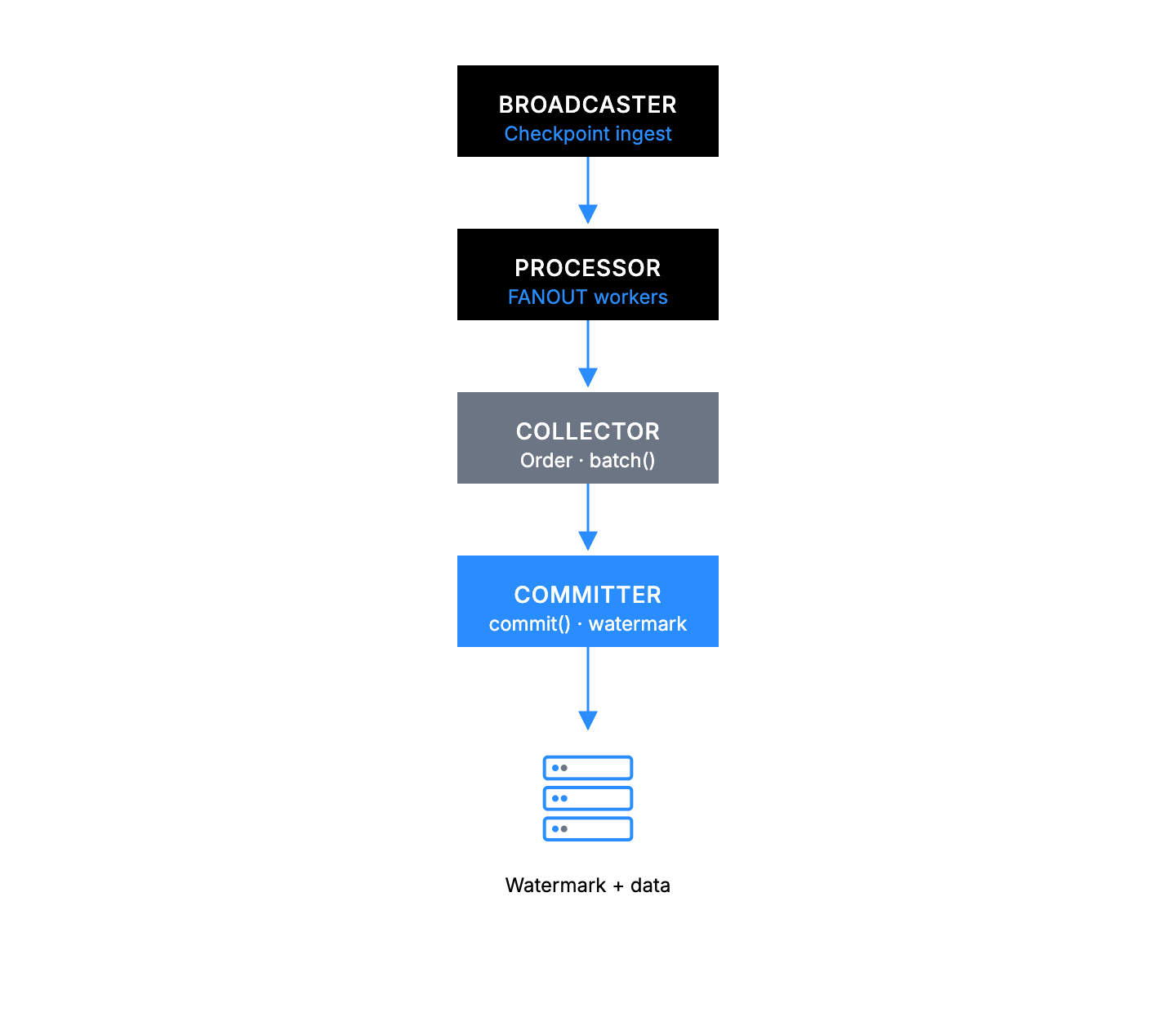
The Broadcaster and Processor components use identical backpressure mechanisms, adaptive parallel processing, and processor() implementations to the concurrent pipeline. The Processor component is described in detail in the Common pipeline components section.
The Collector orders out-of-order checkpoints, assembles them into batches through your batch() logic, and hands those batches to the Committer, which writes them to the database in strict checkpoint order through your commit() logic. The two stages run as independent tasks connected by a bounded channel (pipeline_depth), so the Collector can prepare the next batch while the Committer flushes the current one. Concurrent pipelines share the same Collector + Committer split but additionally have CommitterWatermark, ReaderWatermark, and Pruner components. None of those extra components are required in the sequential pipeline because commits and watermark updates happen in a single transaction and there is no pruning.
Sequential pipeline components
Sequential pipelines have two pipeline-specific components in addition to the shared Processor: the Collector and the Committer.
Collector
The sequential Collector receives out-of-order processed data from the Processor, orders it by checkpoint sequence, and assembles batches using your batch() logic. The Collector dispatches a batch when either collect_interval_ms elapses or MIN_EAGER_ROWS have accumulated and the next expected checkpoint has arrived. The Collector also bounds how many checkpoints contribute to a single batch (MAX_BATCH_CHECKPOINTS). MAX_PENDING_ROWS is a soft cap: when exceeded, the Collector yields from eagerly draining its input channel to flush what it can. Receive itself is never hard-gated, because a missing predecessor for the next commit might still be sitting in the input channel and blocking receive would risk deadlock.
batch(): Data merging logic.
fn batch(&self, batch: &mut Self::Batch, values: std::vec::IntoIter<Self::Value>);
Committer
The sequential Committer receives fully-assembled batches from the Collector and writes them to the database one at a time (strict ordering is required so that watermarks advance monotonically). Each commit runs inside a single transaction that includes both the row updates and the watermark update, so commits and watermark advances are atomic. On commit failure, the Committer retries the same batch under exponential backoff.
commit(): Database write logic.
async fn commit<'a>(
    &self,
    batch: &Self::Batch,
    conn: &mut <Self::Store as Store>::Connection<'a>,
) -> anyhow::Result<usize>;
Sequential pipeline backpressure mechanisms
Sequential pipelines use two layers of backpressure to prevent memory overflow and ordering-related deadlocks:
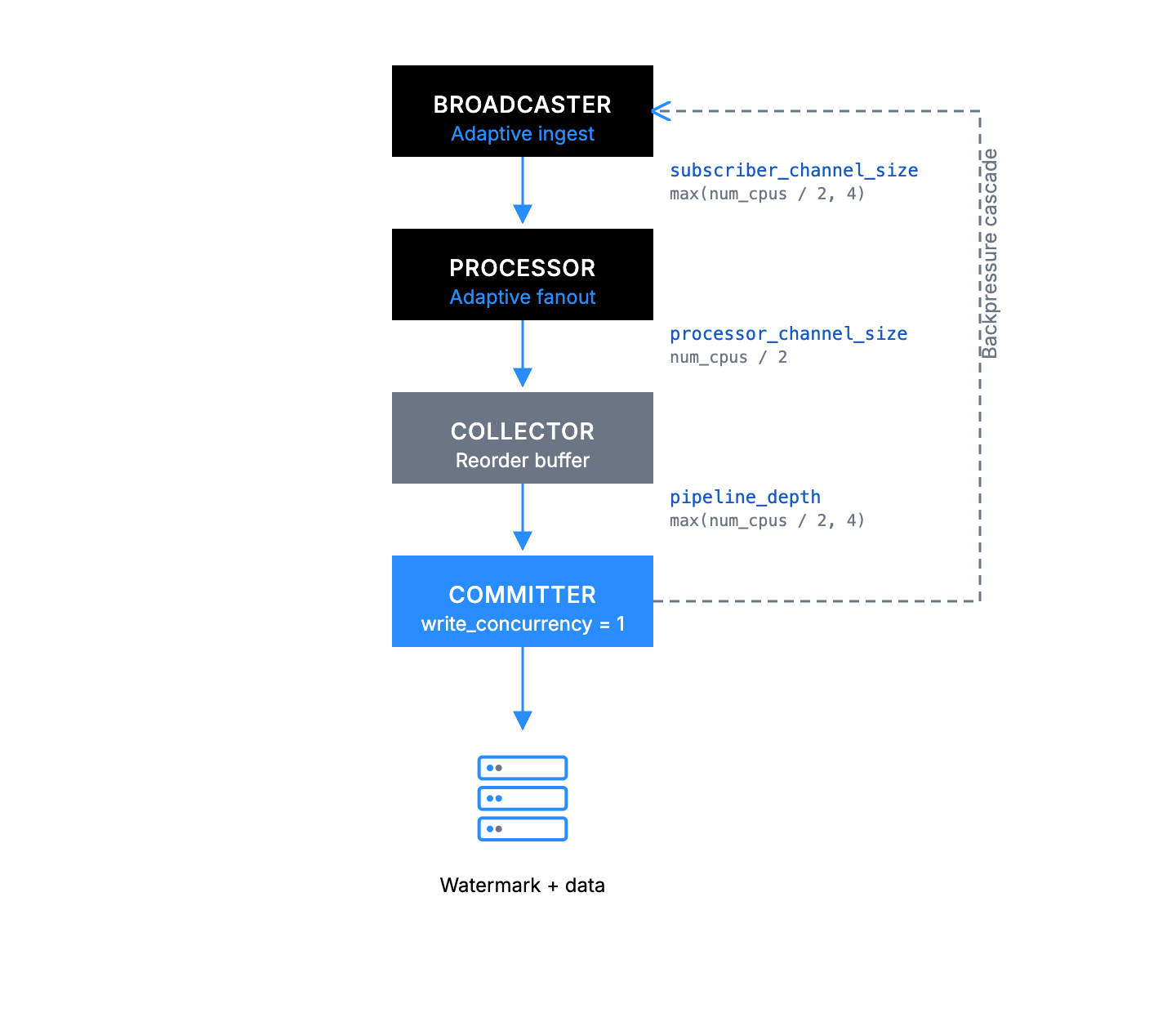
Channel-based backpressure
Sequential pipelines use the same bounded-channel backpressure model as concurrent pipelines:
- Broadcaster → Processor: bounded channel with
subscriber_channel_sizeslots. Send blocks when full, and the broadcaster's adaptive controller reads the channel'slen / capacityand cuts ingest concurrency as the subscriber falls behind. - Processor → Collector:
processor_channel_sizeslots (defaults tonum_cpus / 2). Drives the processor's adaptivefanoutcontroller (fanoutis the processor's concurrency, which an adaptive controller adjusts based on how full this channel is). - Collector → Committer:
pipeline_depthslots (defaults tomax(num_cpus / 2, 4)). Lets the collector stage the next batch while the committer flushes the current one. When full, the collector blocks on send.
Downstream pressure propagates backward: the committer slows, the collector-to-committer channel fills, the collector stops draining its reorder buffer, the processor-to-collector channel fills and collapses fanout to the minimum, and finally the broadcaster-to-processor channel fills and the broadcaster cuts ingest_concurrency. The collector itself holds an unbounded in-memory buffer of pending checkpoints so that out-of-order arrivals can still form a contiguous prefix to commit.
Performance tuning
Sequential pipelines have a more basic configuration but do require critical tuning parameters:
use sui_indexer_alt_framework::config::ConcurrencyConfig;

let config = SequentialConfig {
    committer: CommitterConfig {
        // Not applicable to sequential pipelines
        write_concurrency: 1,

        // Batch collection frequency in ms (default: 500)
        collect_interval_ms: 1000,
    },

    // Adaptive concurrency (default). Starts at 1 and scales up to num_cpus.
    fanout: None,
    // Or use fixed concurrency:
    // fanout: Some(ConcurrencyConfig::Fixed { value: 20 }),
    // Or customize adaptive bounds:
    // fanout: Some(ConcurrencyConfig::Adaptive {
    //     initial: 5,
    //     min: 1,
    //     max: 32,
    // }),

    min_eager_rows: None,
    max_pending_rows: None,
    max_batch_checkpoints: None,
    processor_channel_size: None, // defaults to num_cpus / 2
    pipeline_depth: None,         // defaults to max(num_cpus / 2, 4)

    // Per-pipeline overrides for the ingestion layer's defaults.
    ingestion: pipeline::IngestionConfig {
        // None falls back to the built-in default (max(num_cpus / 2, 4)).
        subscriber_channel_size: None,
    },
};
collect_interval_ms: Higher values allow more checkpoints per batch, improving efficiency.write_concurrency: A field of theCommitterConfigstruct that both pipeline types share. Not applicable to sequential pipelines (always single-threaded writes).fanout: By default, processor concurrency is adaptive: it starts at 1 and scales up to the number of CPUs based on downstream channel pressure. The controller monitors the fill fraction of the processor-to-collector channel and adjusts concurrency using a dead band between 60% and 85% fill. You can override this with fixed concurrency (ConcurrencyConfig::Fixed) or customize the adaptive bounds (ConcurrencyConfig::Adaptive). The default max ofnum_cpusis for CPU-bound processors. If your processor performs IO (for example, fetching data from an external service), you might want a higher max. The adaptive controller also exposes adead_bandparameter to override the fill-fraction thresholds, but the defaults should work well for most workloads.ingestion.subscriber_channel_size: Capacity of the bounded broadcaster-to-processor channel. Defaults tomax(num_cpus / 2, 4)whenNone. A pipeline that occasionally sees bursts can raise its own capacity, but note that a larger value makes this pipeline appear "less full" to the shared controller, so it triggers throttling later than its peers.processor_channel_size: Controls the size of the channel between the processor and the collector. Defaults tonum_cpus / 2. This channel is also the signal that drives the adaptive concurrency controller.pipeline_depth: Controls the size of the channel between the collector and the committer. Defaults tomax(num_cpus / 2, 4). Larger values let the collector stay further ahead of a slow committer (absorbing bursts);1means one batch can be staged while another is committing.max_pending_rows: Soft cap on how many rows the collector buffers before yielding to the flush phase. Unlike the concurrent pipeline'sMAX_PENDING_ROWS, this is not a hard backpressure gate. Receive is never blocked on it, because a missing predecessor for the next commit might still be sitting in the input channel. It only bounds receive-to-flush latency in the happy path.
How does a concurrent pipeline work?
Concurrent pipelines transform raw checkpoint data into indexed database records through a sophisticated multi-stage architecture designed for maximum throughput while maintaining data integrity. The watermark system covered in the watermark system section is fundamental to how every component coordinates.
Architecture overview
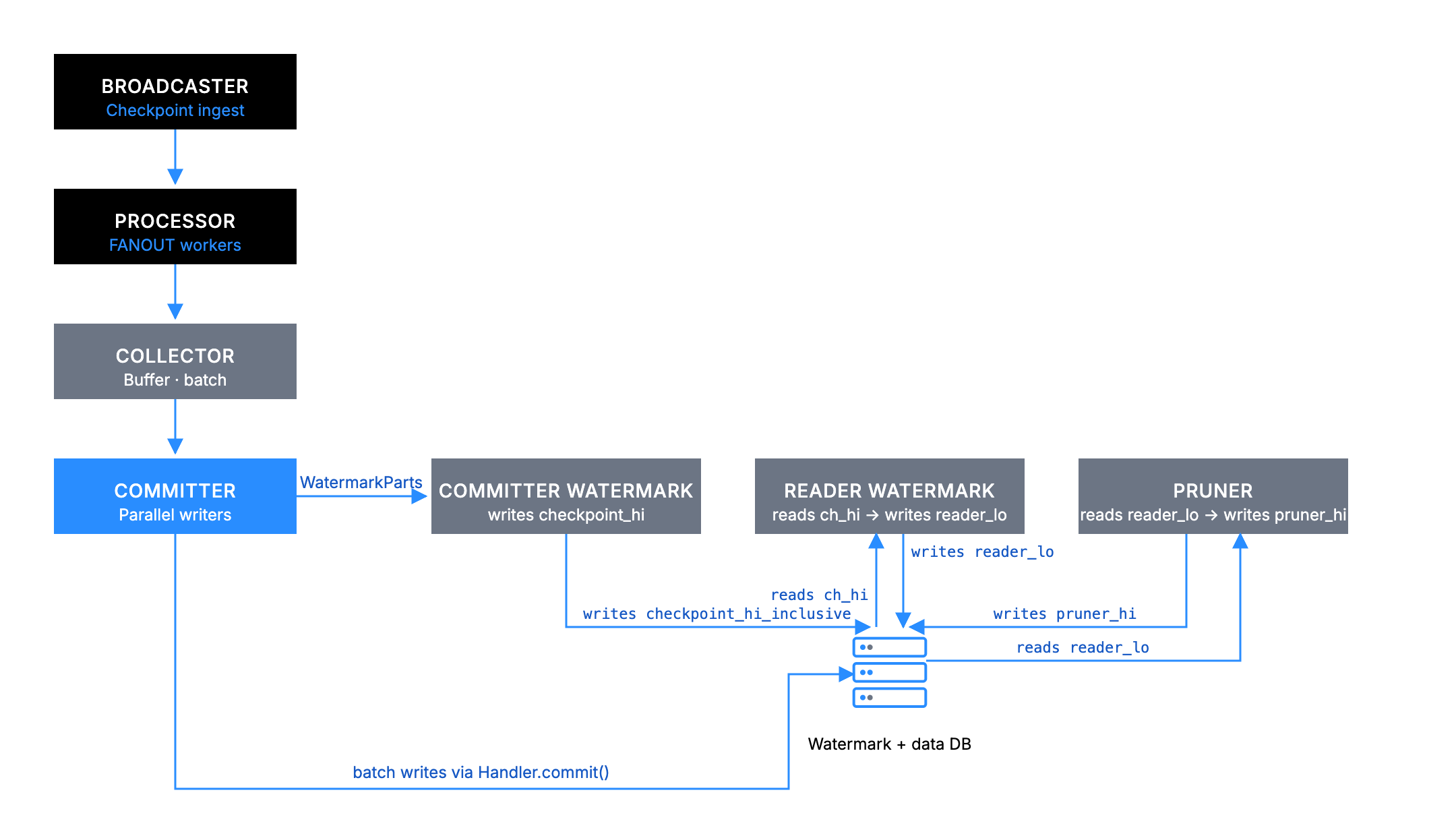
Key design principles:
- Watermark coordination: Safe out-of-order processing with consistency guarantees.
- Handler abstraction: Where your business logic plugs into the framework.
- Automatic storage management: Framework handles watermark tracking and data cleanup within the
Watermarkdatabase.
Concurrent pipeline components
Concurrent pipelines have five pipeline-specific components in addition to the shared Processor:
Collector
The primary responsibility of the Collector is to buffer processed data and create user-configurable batches for database writes.
The Collector receives out-of-order processed data from multiple Processor workers. It then buffers data until reaching optimal batch size (MIN_EAGER_ROWS, default 50) or until a timeout is met (to preserve forward progress for quiet pipelines).
Variable not found. If code is formatted correctly, consider using code comments instead.
The Collector combines data from multiple checkpoints into single database write batches and applies backpressure when too much data is pending (MAX_PENDING_ROWS, default 5000).
/// If there are more than this many rows pending, the committer applies backpressure.
const MAX_PENDING_ROWS: usize = 5000;
Database writes are expensive; batching dramatically improves throughput by reducing the number of database round trips.
Committer
The Committer primarily writes batched data to the database using parallel connections with retry logic. It does this by receiving optimized batches from Collector, then spawns up parallel database writers to write_concurrency.
#[derive(Serialize, Deserialize, Debug, Clone)]
pub struct CommitterConfig {
    /// Number of concurrent writers per pipeline.
    pub write_concurrency: usize,

    /// Minimum time between two watermark writes of a concurrent pipeline, in milliseconds. A
    /// watermark that advances once this much time has passed since the previous write is written
    /// immediately; one that advances sooner is written when the gap has passed.
    pub watermark_interval_ms: u64,

    /// Maximum random jitter to add to the watermark interval, in milliseconds.
    pub watermark_interval_jitter_ms: u64,

    /// How many rows the collector waits for before it cuts them into a batch. With the default
    /// of 0, pending rows are cut into a batch as soon as the committer has room for one, so
    /// batches only grow while the committer is busy. Stores that prefer fewer, larger writes can
    /// raise this; rows then wait until this many are pending, or until the oldest has waited
    /// `max_batch_delay_ms`.
    #[serde(default)]
    pub min_batch_rows: usize,

    /// Longest time, in milliseconds, that pending rows wait for `min_batch_rows` to be reached
    /// before they are written anyway. Not used while `min_batch_rows` is 0.
    #[serde(default = "default_max_batch_delay_ms")]
    pub max_batch_delay_ms: u64,
}
- Each writer calls your
Handler::commit()method with exponential backoff retry. - Reports successful writes to the
CommitterWatermarkcomponent.
The Committer tasks don't actually perform database operations. Rather, it calls your handler's commit() method. You must implement the actual database logic.
CommitterWatermark
The primary responsibility of the CommitterWatermark is to track which checkpoints are fully committed and update checkpoint_hi_inclusive in the Watermark table.
The CommitterWatermark receives WatermarkParts from successful Committer writes.
/// A representation of the proportion of a watermark.
#[derive(Debug, Clone)]
struct WatermarkPart {
    /// The watermark itself
    watermark: CommitterWatermark,
    /// The number of rows from this watermark that are in this part
    batch_rows: usize,
    /// The total number of rows from this watermark
    total_rows: usize,
}
The CommitterWatermark maintains an in-memory map of checkpoint completion status, advancing checkpoint_hi_inclusive only when there are no gaps in the sequence. Periodically, it writes the new checkpoint_hi_inclusive to the Watermark database.
This component enforces the critical rule that checkpoint_hi_inclusive can advance only when all data up to that point is committed with no gaps. See the watermark system for details on how this enables safe out-of-order processing.
By using polling, updates happen on a configurable interval (watermark_interval_ms) rather than immediately, balancing consistency with performance.
#[derive(Serialize, Deserialize, Debug, Clone)]
pub struct CommitterConfig {
    /// Number of concurrent writers per pipeline.
    pub write_concurrency: usize,

    /// Minimum time between two watermark writes of a concurrent pipeline, in milliseconds. A
    /// watermark that advances once this much time has passed since the previous write is written
    /// immediately; one that advances sooner is written when the gap has passed.
    pub watermark_interval_ms: u64,

    /// Maximum random jitter to add to the watermark interval, in milliseconds.
    pub watermark_interval_jitter_ms: u64,

    /// How many rows the collector waits for before it cuts them into a batch. With the default
    /// of 0, pending rows are cut into a batch as soon as the committer has room for one, so
    /// batches only grow while the committer is busy. Stores that prefer fewer, larger writes can
    /// raise this; rows then wait until this many are pending, or until the oldest has waited
    /// `max_batch_delay_ms`.
    #[serde(default)]
    pub min_batch_rows: usize,

    /// Longest time, in milliseconds, that pending rows wait for `min_batch_rows` to be reached
    /// before they are written anyway. Not used while `min_batch_rows` is 0.
    #[serde(default = "default_max_batch_delay_ms")]
    pub max_batch_delay_ms: u64,
}
ReaderWatermark
The primary responsibility of the ReaderWatermark is to calculate and update reader_lo to maintain the retention policy and provide safe pruning boundaries.
The ReaderWatermark polls the Watermark database periodically (interval_ms) to check current checkpoint_hi_inclusive. It then calculates the new reader_lo = checkpoint_hi_inclusive - retention + 1 value and updates the reader_lo and pruner_timestamp in the Watermark database. This behavior provides the safety buffer that prevents premature pruning.
The reader_lo value represents the lowest checkpoint guaranteed to be available. This component ensures your retention policy is maintained. See the watermark system section for details on how reader_lo creates safe reading zones.
Pruner
The primary responsibility of the Pruner is to remove old data based on retention policies and to update pruner_hi.
The Pruner waits for the safety delay (delay_ms) after reader_lo updates.
#[derive(Serialize, Deserialize, Debug, Clone)]
pub struct PrunerConfig {
    /// How often the pruner should check whether there is any data to prune, in milliseconds.
    pub interval_ms: u64,

    /// How long to wait after the reader low watermark was set, until it is safe to prune up until
    /// this new watermark, in milliseconds.
    pub delay_ms: u64,

    /// How much data to keep, this is measured in checkpoints.
    pub retention: u64,

    /// The maximum range to try and prune in one request, measured in checkpoints.
    pub max_chunk_size: u64,

    /// The max number of tasks to run in parallel for pruning.
    pub prune_concurrency: u64,
}
The Pruner then calculates which checkpoints can be safely deleted and spawns up to prune_concurrency parallel cleanup tasks.
#[derive(Serialize, Deserialize, Debug, Clone)]
pub struct PrunerConfig {
    /// How often the pruner should check whether there is any data to prune, in milliseconds.
    pub interval_ms: u64,

    /// How long to wait after the reader low watermark was set, until it is safe to prune up until
    /// this new watermark, in milliseconds.
    pub delay_ms: u64,

    /// How much data to keep, this is measured in checkpoints.
    pub retention: u64,

    /// The maximum range to try and prune in one request, measured in checkpoints.
    pub max_chunk_size: u64,

    /// The max number of tasks to run in parallel for pruning.
    pub prune_concurrency: u64,
}
Each task calls your Handler::prune() method for specific checkpoint ranges and updates pruner_hi as cleanup completes.
The Pruner tasks don't actually delete data. Rather, they call your handler's prune() method. You must implement the actual cleanup logic.
The Pruner operates in the range between the current pruner_hi and the safe boundary determined by reader_lo, ensuring readers are never affected. See the watermark system for details on the three-watermark coordination.
Handler abstraction
The Handler is where you implement your indexing business logic. This follows a callback pattern: you implement the trait methods, and the framework calls them at the appropriate pipeline stage. The framework calls three key methods:
trait Processor {
    // Called by Processor workers
    async fn process(&self, checkpoint: &Arc<Checkpoint>) -> anyhow::Result<Vec<Self::Value>>;
}

trait Handler {
    // Called by Committer workers
    async fn commit(&[Self::Value], &mut Connection) -> Result<usize>;

    // Called by Pruner workers
    async fn prune(&self, from: u64, to: u64, &mut Connection) -> Result<usize>;
}
The framework components (Committer, Pruner) are orchestrators that manage concurrency, retries, and watermark coordination. The actual database operations happen in your Handler methods.
How does the framework manage the Watermark table?
The Watermark table manages all watermark coordination. It is critical for recovery, as the framework reads this table to resume from the correct checkpoint.
The framework automatically creates and manages a Watermark table in your database when you first run your indexer. The table might have only one row per pipeline, allowing multiple indexers to share the same database. Pipelines that share a database also share its connection pool. Size write_concurrency so that the total across all pipelines stays below the connection pool size, as CommitterConfig optimization describes.
Watermark schema:
// @generated automatically by Diesel CLI.

diesel::table! {
    watermarks (pipeline) {
        pipeline -> Text,
        epoch_hi_inclusive -> Int8,
        checkpoint_hi_inclusive -> Int8,
        tx_hi -> Int8,
        timestamp_ms_hi_inclusive -> Int8,
        reader_lo -> Int8,
        pruner_timestamp -> Timestamp,
        pruner_hi -> Int8,
        chain_id -> Nullable<Bytea>,
    }
}
Concurrent pipeline backpressure mechanisms
With the component architecture detailed, you can examine how the pipeline prevents memory overflow through cascading backpressure using inter-component channels.
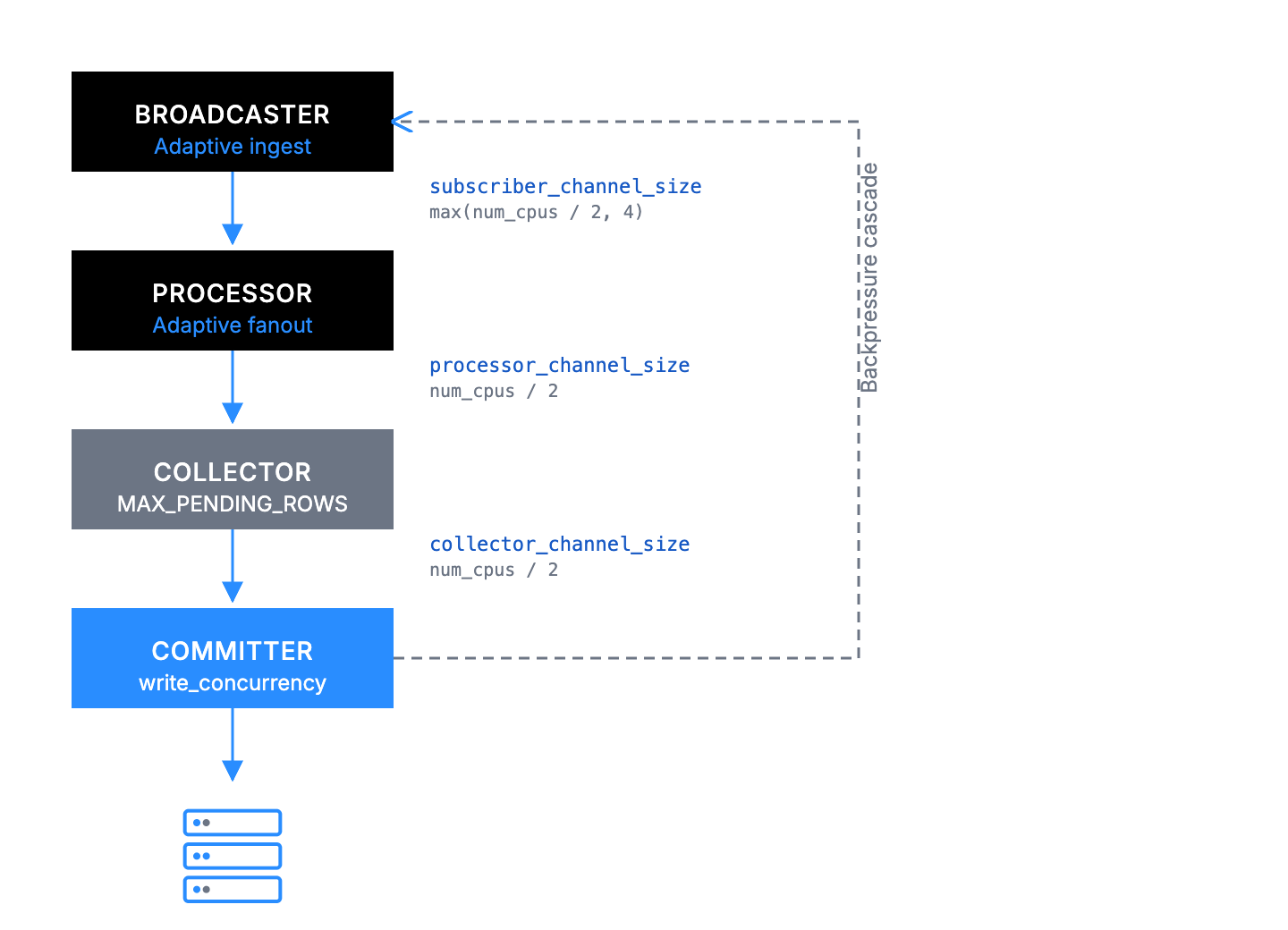
Channel-level blocking with fixed sizes
Each channel has a fixed buffer size that automatically blocks when full:
Broadcaster to Processor: subscriber_channel_size slots → Broadcaster blocks, upstream pressure.
/// Per-pipeline ingestion settings.
#[derive(Serialize, Deserialize, Debug, Clone, Default)]
pub struct IngestionConfig {
    /// Capacity of this pipeline's bounded subscriber channel. If `None`, the built-in default
    /// is used (see [`IngestionConfig::subscriber_channel_size`]).
    pub subscriber_channel_size: Option<usize>,
}
Processor to Collector: processor_channel_size slots (defaults to num_cpus / 2) → All workers block on send().
let (processor_tx, collector_rx) = mpsc::channel(processor_channel_size);
Collector to Committer: collector_channel_size slots (defaults to num_cpus / 2) → Collector stops accepting.
let (collector_tx, committer_rx) = mpsc::channel(collector_channel_size);
When any channel fills, pressure automatically propagates backward through the entire pipeline.
Component-level blocking
At the component level, the Collector respects memory limits and stops accepting when pending_rows ≥ MAX_PENDING_ROWS.
received = rx.recv(), if pending_rows < max_pending_rows => {
    // The processor has stopped, so write out everything that is left.
    let Some(mut indexed) = received else {
        break;
    };

    let reader_lo = reader_lo_atomic.load(Ordering::Relaxed);

    metrics
        .collector_reader_lo
        .with_label_values(&[H::NAME])
        .set(reader_lo as i64);

    let mut recv_cps = 0usize;
    let mut recv_rows = 0usize;
    loop {
        if indexed.checkpoint() < reader_lo {
            indexed.values.clear();
            metrics
                .total_collector_skipped_checkpoints
                .with_label_values(&[H::NAME])
                .inc();
        }

        recv_cps += 1;
        recv_rows += indexed.len();
        pending_rows += indexed.len();
        pending.insert(indexed.checkpoint(), indexed.into());

        if pending_rows >= max_pending_rows {
            break;
        }

        match rx.try_recv() {
            Ok(next) => indexed = next,
            Err(_) => break,
        }
    }

    metrics
        .total_collector_rows_received
        .with_label_values(&[H::NAME])
        .inc_by(recv_rows as u64);
    metrics
        .total_collector_checkpoints_received
        .with_label_values(&[H::NAME])
        .inc_by(recv_cps as u64);

    floor.set_pending(true);
}
Database connection limits are also in place. The Committer blocks when all connections are busy.
Backpressure in practice
Basic example: Slow database scenario (the throughput numbers are illustrative, not measured)
- Initial state: Your indexer is processing 100 checkpoints per second.
- Bottleneck appears: Database becomes slow (because of high load, maintenance, or similar) and can now only handle 50 commits per second.
- Backpressure cascade (each step happens in turn, starting at the
Committerand moving backward):Committerchannel fills up (cannot commit fast enough).Collectorstops sending toCommitter(channel full).Processorchannel fills; its adaptivefanoutcontroller cuts processor concurrency toward the minimum.Broadcastersees the subscriber channel filling and its adaptiveingest_concurrencycontroller cuts fetch concurrency toward the minimum. If the channel reaches capacity, ingest tasks block onsendand checkpoint ingestion pauses until the channel drains.
- End result:
- Indexer automatically slows to 50 checkpoints per second, matching database capacity.
- Memory stays bounded, no runaway growth.
- No data loss as everything just processes slower.
- System is stable at the bottleneck pace.
- Recovery: When database speeds up, channels start draining and indexer automatically returns to full speed.
What happens:
- Slower checkpoint progress in logs and metrics.
- Stable memory usage (no growth).
- System remains responsive, just at reduced throughput.
Performance tuning
The following sections detail the configuration settings you can implement for optimal performance.
Concurrent pipeline Handler constants
Handler constants are the most direct way to tune pipeline behavior. These are implemented as associated constants in your Handler trait implementation and serve as per-handler defaults.
impl concurrent::Handler for MyHandler {
    type Store = Db;

    // Minimum rows to trigger eager commit for committer (default: 50)
    const MIN_EAGER_ROWS: usize = 100;

    // Backpressure threshold on collector (default: 5000)
    const MAX_PENDING_ROWS: usize = 10000;

    // Maximum watermarks per batch (default: 10,000)
    const MAX_WATERMARK_UPDATES: usize = 5000;
}
These constants can also be overridden at runtime through ConcurrentConfig, without recompiling. Config values take precedence over trait constants when present.
use sui_indexer_alt_framework::config::ConcurrencyConfig;

let config = ConcurrentConfig {
    committer: committer_config,
    pruner: Some(pruner_config),
    // Adaptive concurrency (default). Starts at 1 and scales up to num_cpus.
    fanout: None,
    // Or use fixed concurrency:
    // fanout: Some(ConcurrencyConfig::Fixed { value: 20 }),
    // Or customize adaptive bounds:
    // fanout: Some(ConcurrencyConfig::Adaptive {
    //     initial: 5,
    //     min: 1,
    //     max: 32,
    // }),
    min_eager_rows: Some(100),
    max_pending_rows: Some(10000),
    max_watermark_updates: Some(5000),
    processor_channel_size: None, // defaults to num_cpus / 2
    collector_channel_size: None, // defaults to num_cpus / 2
    committer_channel_size: None, // defaults to num_cpus

    // Per-pipeline overrides for the ingestion layer's defaults.
    ingestion: pipeline::IngestionConfig {
        // None falls back to the built-in default (max(num_cpus / 2, 4)).
        subscriber_channel_size: None,
    },
};
Tuning guidelines:
fanout: By default, processor concurrency is adaptive: it starts at 1 and scales up to the number of CPUs based on downstream channel pressure. The controller monitors the fill fraction of the processor-to-collector channel and adjusts concurrency using a dead band between 60% and 85% fill. You can override this with fixed concurrency (ConcurrencyConfig::Fixed) or customize the adaptive bounds (ConcurrencyConfig::Adaptive). The default max ofnum_cpusassumes your processor is CPU-bound. If your processor performs IO (for example, fetching data from an external service), you might want a higher max. The adaptive controller also exposes adead_bandparameter to override the fill-fraction thresholds, but the defaults should work well for most workloads.processor_channel_size: Controls the size of the channel between the processor and the collector. Defaults tonum_cpus / 2. This channel is also the signal that drives the adaptive concurrency controller.collector_channel_size: Controls the size of the channel between the collector and the committer. Defaults tonum_cpus / 2. This is a separate channel from the processor-to-collector channel, and its size is set independently ofprocessor_channel_size. Increase if the committer drains batches faster than the collector can supply them. Sequential pipelines name the equivalent collector-to-committer settingpipeline_depth, which defaults tomax(num_cpus / 2, 4)instead.committer_channel_size: Controls the size of the channel between the committer and the watermark updater. Defaults tonum_cpus. Rarely needs tuning.ingestion.subscriber_channel_size: Capacity of the bounded broadcaster-to-processor channel. Defaults tomax(num_cpus / 2, 4)whenNone. Raise it for a pipeline that needs more headroom against ingestion bursts. A larger value means this pipeline triggers the adaptive ingest controller's throttling later than its peers.MIN_EAGER_ROWS: Lower values reduce data commit latency (individual data appears in database sooner), higher values improve overall throughput (more efficient larger batches).MAX_PENDING_ROWS: Controls how much data can accumulate when the committer falls behind. Higher values provide more buffer space but use more memory during bottlenecks.MAX_WATERMARK_UPDATES: Lower for sparse pipelines (rare events), keep default for dense pipelines.
CommitterConfig optimization
The CommitterConfig controls how data flows from collection to database commits:
let config = ConcurrentConfig {
    committer: CommitterConfig {
        // Number of parallel database writers (default: 5)
        write_concurrency: 10,

        // How often collector checks for batches in ms (default: 500)
        collect_interval_ms: 250,

        // How often watermarks are updated in ms (default: 500)
        watermark_interval_ms: 1000,

        // Maximum random jitter added to watermark interval in ms (default: 0)
        watermark_interval_jitter_ms: 100,
    },
    pruner: Some(pruner_config),
    ..Default::default()
};
..Default::default() sets every ConcurrentConfig field that you do not list to its default value. The full ConcurrentConfig example in Concurrent pipeline Handler constants shows the other fields and their defaults.
Tuning guidelines:
write_concurrency: Higher values result in faster throughput but more database connections;ensure total_pipelines × write_concurrency < db_connection_pool_size.collect_interval_ms: Lower values reduce latency but increase CPU overhead.watermark_interval_ms: Controls how often watermarks are updated. Higher values reduce database contention from frequent watermark writes but make the indexer slower to respond to pipeline progress.
PrunerConfig settings
Configure data retention and pruning performance:
let pruner_config = PrunerConfig {
    // Check interval for pruning opportunities in ms (default: 300,000 = 5 min)
    interval_ms: 600_000, // 10 minutes for less frequent checks

    // Safety delay after reader watermark update in ms (default: 120,000 = 2 min)
    delay_ms: 300_000, // 5 minutes for conservative pruning

    // How many checkpoints to retain (default: 4,000,000)
    retention: 10_000_000, // Keep more data for analytics

    // Max checkpoints to prune per operation (default: 2,000)
    max_chunk_size: 5_000, // Larger chunks for faster pruning

    // Parallel pruning tasks (default: 1)
    prune_concurrency: 3, // More parallelism for faster pruning
};
Tuning guidelines:
retention: Balance storage costs versus data availability needs.max_chunk_size: Larger values faster pruning, but longer database transactions.prune_concurrency: Do not exceed database connection limits.delay_ms: Increase for safety, decrease for aggressive storage optimization.